Friday, September 9, 2016

Memory Devices

  • Computer memory is the storage space in computer where data is to be processed and instructions required for processing are stored.
  • The memory is divided into large number of small parts. Each part is called a cell. Each location or cell has a unique address which varies from zero to memory size minus one.

Types of Memory :

  1. Internal memory.
  2. External memory.

1.Internal memory :

  • Internal memory also known as main memory or primary memory.
  • Internal memory is the only one memory which directly accessible to the CPU. The CPU continuously reads instructions stored there and executes them as required.
  Types of Internal Memory :
  • RAM, ROM.
  1. RAM :
  2. ROM :

2.External memory :

  • External memory also known as secondary memory or Auxiliary memory.
  • External memory devices also used for storage purpose only. But,they are not integrated with the computer.
  Types of External Memory :
  • External memory devices are CD's,DVD's,Hard disk, pen drive's,Memory card's etc. 
1.CD Drive 2.DVD Drive
3.Hard disk :
 
4.Pendrive :

5.Memory card :

RAM

  • RAM stands for Random Access Memory.
  • RAM is primary storage device of the computer.It allows the user to read and write the device.It stores the data permanently.
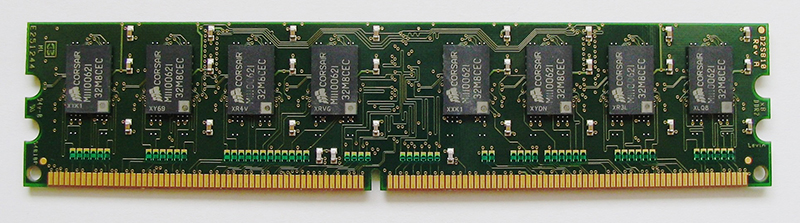
  • Random Access Memory (RAM) is a type of data storage used in computers that is generally located on the motherboard.


  • RAM is invented by Robert Dennard initiated in 1960's and released in the year of 1968.
  • RAM costs are cheap.For 8GB Expect to pay $75,$125  for 16GB of RAM.
  • RAM is much faster to read and write the data compared to the other storage devices.
  • RAM is volatile. i.e means RAM loses the data after shut down . 

Types of RAM :

  1. Static RAM (SRAM)
  2. Dynamic RAM (DRAM)

1.Static RAM :

  • The word static indicates that the memory retains its contents as long as power is being supplied. However, data is lost when the power gets down due to volatile nature. SRAM chips use a matrix of 6-transistors and no capacitors. 
  • SRAM is faster when compared to the DRAM in accessing the data.


2.Dynamic RAM :

  • Dynamic random-access memory (DRAM) is a type of RAM that stores each bit of data in a separate capacitor within an integrated circuit. The capacitor can be either charged or discharged; these two states are taken to represent the two values of a bit, conventionally called 0 and 1. 


  • DRAM is widely used in digital electronics where low-cost and high-capacity memory is required.
  • The advantage of DRAM is its structural simplicity: only one transistor and a capacitor are required per bit, compared to four or six transistors in SRAM

Difference between the SRAM AND DRAM :

  • SRAM is static while DRAM is dynamic.
  • SRAM is faster compared to DRAM.
  • SRAM consumes less power than DRAM.
  • SRAM uses more transistors per bit of memory compared to DRAM.
  • SRAM is more expensive than DRAM.
  • Cheaper DRAM is used in main memory while SRAM is commonly used in cache memory

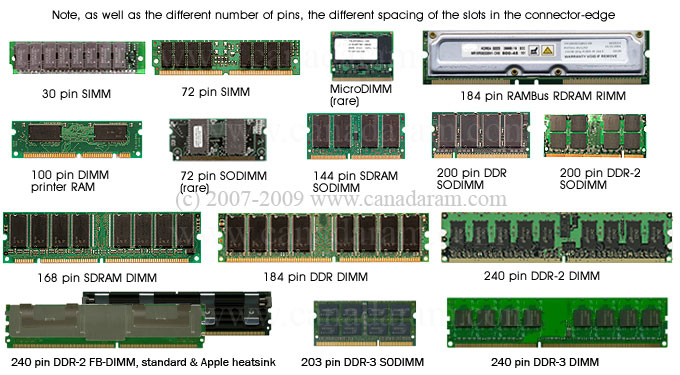
RAM CATEGORIES :


Aspect Ratio

  • Aspect ratio is an image projection attribute that describes the proportional relationship between the width and height of an image.
  • The most common aspect ratio for TVs and monitors or computers is currently 16:9 ,which offers perfect fit for high definition television shows.


Types of Aspect ratio :

  • The common aspect ratios used are 1.33:1, 1.37:1, 1.43:1, 1.50:1, 1.56:1, 1.66:1, 1.75:1, 1.78:1, 1.85:1, 2.00:1, 2.20:1, 2.35:1, 2.39:1, 2.55:1 and other ratios.
  • 1:1 Format :

  • 2:3 Ratio Format :

  • 3:2 Ratio Format :

  • 3:4 Format :

  • 4:3 Ratio Format :

  • 4:5 Ratio Format :

  • 5:4 Ratio Format :

  • 7:6 Ratio Format :

  • 16:9 Ratio Format :

Examples :


Thursday, September 8, 2016

Consistency

  • Consistency means the ability to remain same in behaviour,attitudes,or qualities.
  • Consistent means the same or constant result throughout the process. 
  • Consistency means the behaving in the same way.
Consistency
No Consistency  

Consistency Types:

  1. Aesthetic consistency.
  2. Functional consistency.
  3. Internal consistency.
  4. External consistency.

  Aesthetic consistency :

  • Aesthetic consistency is keeping similar design principle's with products to continue the design or a brand,.
  • Usage:making it easily identifiable to anyone who has seen that brand before.
By seeing icon / logo we will identify brand.

Functional consistency :

  • Functional consistency means action of symbol.
  • Usage :Functional consistency improves usability and learnability.

Every one knows the functionality of these symbols
Internal Consistency :
  • Internal consistency means the comparing consistency of elements with in the same system.
  • Usage:we will use in websites.


External Consistency : 
  • External consistency means the comparing consistency of elements with outside of the elements.
These symbols knows everyone in world


Advantages of consistency :

  • Builds trust.
  • Encourages loyalty,
  • Creates momentum, and
  • Drives engagement.


Examples :